

What’s new in Empi
Thoughtful improvements to make room for what matters.
New
Copy booking links from the macOS menu bar
Share your booking page, groups, and meeting types directly from Empi’s menu bar.
Open Booking in Empi’s macOS menu bar and choose your booking page, a group, or a published meeting type. Its public link is copied to your clipboard, ready to paste into a message, even when the main Empi window is hidden.
The menu uses the same published links as the app and loads them when Empi starts. Use Refresh Empi to pick up changes to your Booking settings. You will find it between today’s agenda and the creation actions.
Improved
Move and edit bookings directly in your calendar
Drag bookings to a new time and edit them with the same conferencing, guest and notification controls as other events.
Bookings can now be dragged to a different date or time from Agenda or the calendar sidebar. Review the proposed slot before saving; the booking keeps its duration and existing conflict checks.
Booking edits now open the standard event editor, including video conferencing, guests, notifications, privacy and availability settings.
Times open in your agenda's time zone and keep the selected local hours after saving. Changing the start preserves the duration, and invalid end times cannot be saved.
Bookings remain one-off appointments with a start and end time.
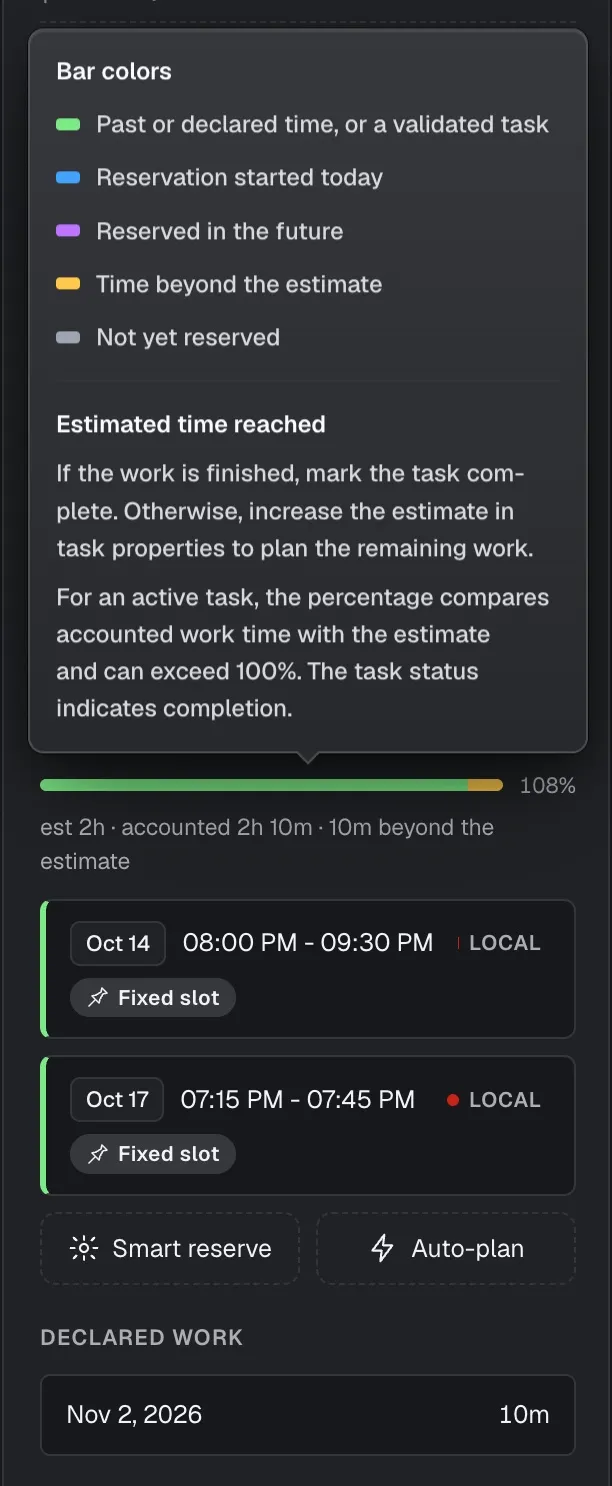
Clearer task time and estimate progress
Keep a numeric percentage beyond 100%, understand the bar colors, and see when a task needs a larger estimate to be planned again.
Active tasks now keep a numeric time-use percentage when their accounted work reaches or exceeds the estimate. For example, 2h 10m against a 2h estimate shows 108%. Future reservations do not count as work already accounted for, and reaching 100% does not complete a task.
Hover over the progress bar, focus it with the keyboard, or tap it on a touch device to see what each color means. A separate section explains when the estimate has been used: complete the task if the work is finished, or increase its existing Estimate property so the planner can schedule more time.
Declared-work history also separates each date from its duration for easier reading.
See what moves your plan
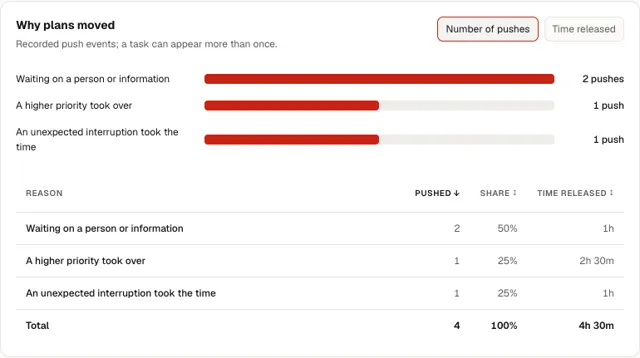
Compare push reasons visually, sort the details, and get a more complete view of recorded work in Habits.
Habits now pairs push reasons with a bar chart and a sortable table. Switch between the number of pushes and released time, or sort the numeric columns to see which reasons stand out.
Weekly rescheduling uses the full content width and includes weeks with no pushes. The period results also include positive work declarations made without a reservation and work attributed from another task’s push, while keeping each task in a single outcome category.
Catch-up confirmations use the day being reviewed. Habits refreshes while you use it and shows when its figures were last calculated.
Plan ahead across projects and time slots
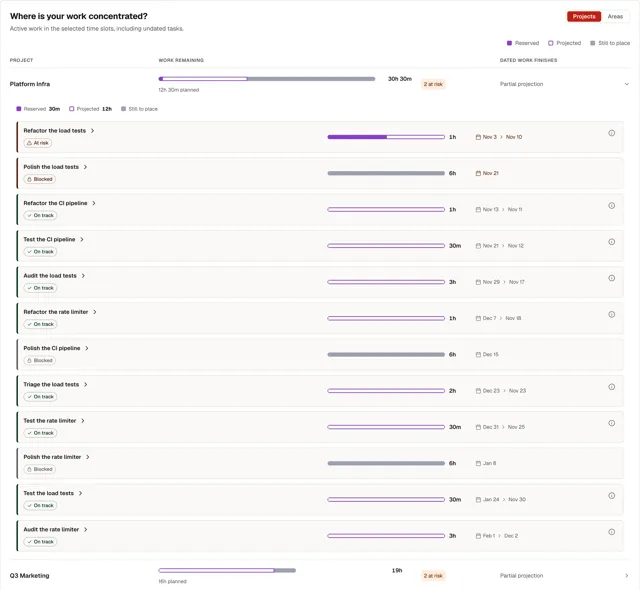
Compare workload with calendar-aware capacity and spot deadlines that need attention.
Forecast now helps you understand the weeks ahead with a clearer view of your workload.
- Compare projected work with available capacity by day or week.
- Include all configured time slots by default, or select the hours you want to explore.
- Respect each task's inherited calendar rules, count overlapping hours once and keep rest breaks in the calculation.
- Explore projects and areas with colored task states and the familiar allocation palette: solid reserved time, outlined projections and grey unplaced work, with calculations available in one click.
- Keep outside-scope tasks, undated work and missing estimates inspectable without inventing completion dates.
Fixed bookings and virtual projections remain distinct. What If and Forecast Studio have been removed.
Fixed
Desktop updates keep checking while you work
Empi checks for updates every day while it stays open, and update preferences refresh automatically.
Empi now continues checking for updates every 24 hours while the desktop app stays open. If your Mac was asleep when a check became due, Empi checks after it wakes.
Preferences → Updates refreshes automatically while visible and when you return to it, so an installed update and its restart action appear without reopening the window.
The instructions also explain what happens automatically: verified updates download and install in the background, then become active the next time you launch Empi. You can restart immediately or keep working until your next launch.