

What’s new in Empi
Thoughtful improvements to make room for what matters.
New
Timestamp your writing with /now
Insert the current date and time without leaving the editor.
Type /now on a new line in a note, task description, or task template, then select Current date and time.
Empi inserts the current date and time using your language, time zone, and 12- or 24-hour clock preference. The timestamp stays fixed when you save or reopen your writing.
Improved
Select Agenda calendars by time slot
Quickly show or hide related calendars from the Agenda sidebar using your existing time slots.
Agenda now opens its calendar selector on Time slots. Toggle a slot to show or hide all calendars associated with it, or switch to Calendars for individual control. Both views keep the same selection, and calendars without a time slot remain easy to find.
Show declined events now sits to the left of the Day, Week, and Month controls.
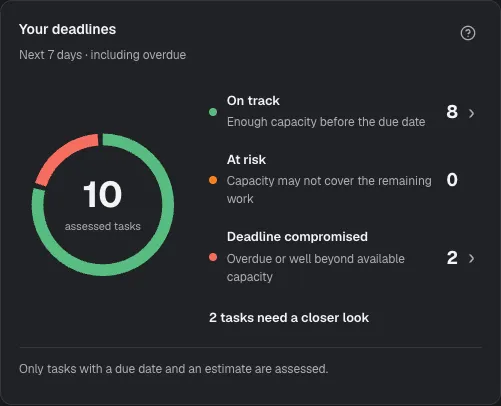
Your deadlines, at a glance
See your full deadline outlook and open the matching tasks straight from Today.
Today now brings your deadline outlook into one view. A segmented ring shows assessed tasks due in the next seven days, including overdue work, grouped as On track, At risk, or Deadline compromised.
Select a segment or its category to open the matching tasks in List. A removable deadline filter keeps the list focused on that group, including matching subtasks.
The question-mark button explains the forecast and its exclusions. Tasks need both a due date and an estimate to be assessed; the forecast provides capacity guidance rather than a delivery guarantee.
The weekly overview also keeps consistent bar heights when the layout narrows.
See the breakdown of your task time
Task bar legends now show a percentage for every color, including unused categories.
Hover over a task bar, focus it with your keyboard, or tap it to see the share represented by each color. Percentages appear before the descriptions, making past or declared time, today’s reservations, future reservations, time beyond the estimate, and unreserved time easier to compare.
The legend also explains how these shares differ from the percentage beside the bar, which compares accounted work time with the estimate for active tasks and can exceed 100%.
The legend expands to a comfortable reading width when space allows and stays within the screen on smaller displays. Descriptions wrap only when needed, without splitting words.
Fixed
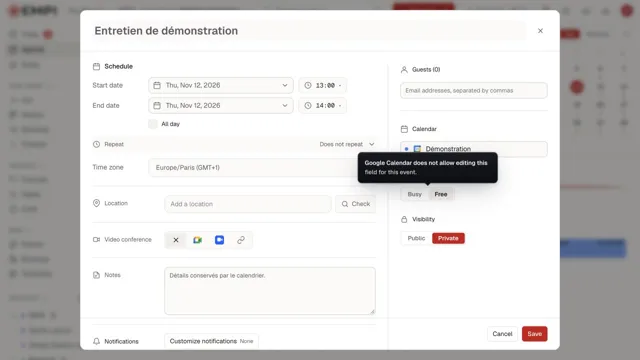
Know which calendar fields you can edit
Fields locked by your calendar now stay readable and read-only, with a clear explanation on web, desktop, and mobile.
When Google Calendar or Outlook does not allow a field to change, Empi now shows that restriction before you save. Hover or focus the field on web and desktop, or tap its information icon on mobile.
Other fields remain available when your calendar allows them. Changes to reminders also preserve the event’s existing details and visibility.
Email captures keep links intact
Links in newly captured emails stay readable and clickable when you edit or reopen a task or note.
When you capture an email from Gmail or Outlook, web links keep their dots, hyphens, query parameters, and fragments. Editing and reopening the resulting task or note preserves the destination without adding escape characters.
This correction applies to new email captures. Previously saved content is unchanged.
Faster calendar resizing, clearer sync progress
See individual calendar moves and duration changes immediately while your calendar finishes syncing.
When you confirm a new duration or move a single event or task slot, the calendar now shows the change immediately, including any neighboring slots listed in your preview.
Calendar updates are grouped to reduce repeated refreshes. Normal synchronization no longer appears as a failed operation or asks you to retry. Temporary problems are retried up to three times with a short pause between attempts; if recovery still needs your help, Empi keeps the action available.