
What’s new in Empi
Thoughtful improvements to make room for what matters.
Improved
See what's coming next in the Mac menu bar
Your next meeting, task or commute can take priority before it starts, with a preparation window you can adjust.
The Mac menu bar now brings your next agenda item into view before it starts, even while another task or meeting is still in progress. By default, it switches 15 minutes ahead, so you can see what's coming and prepare for it.
Open Preferences → Appearance → Status bar and adjust Show the next item before it starts to any whole number from 0 to 240 minutes. Set it to 0 to turn anticipation off. This setting stays on your Mac and is independent of reminder notifications and the secondary next-event countdown.
Your existing visibility filters still apply. When activities overlap, the most recently started ongoing item stays in view once it begins, unless another upcoming item is already inside your preparation window.
Clearer calendar totals in Forecast
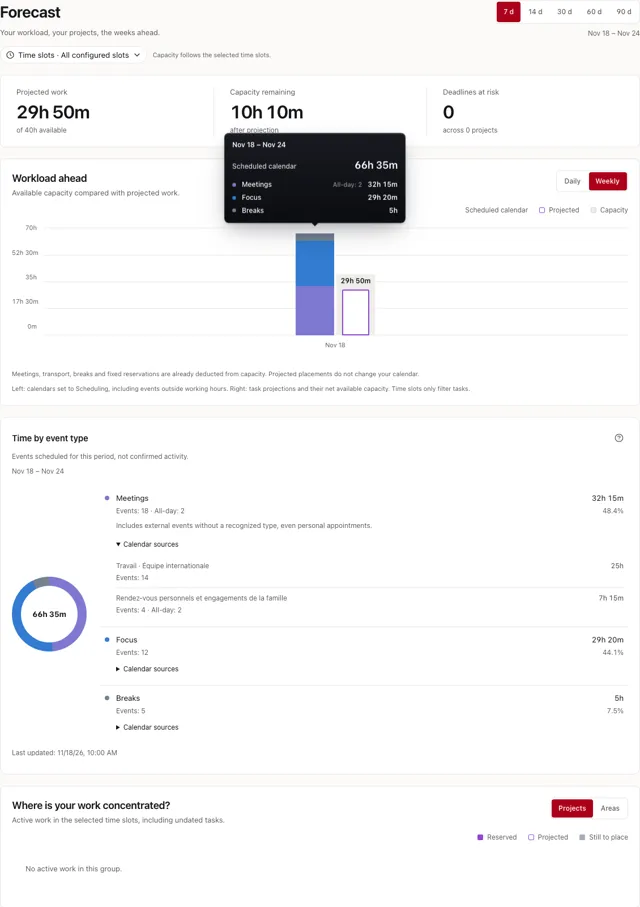
See which calendars contribute to each event type, with cleaner chart tooltips and totals limited to calendars enabled for scheduling.
Forecast makes the origin of calendar activity clearer. Totals include calendars set to Scheduling, alongside your enabled local Empi calendar. View-only calendars are excluded.
Open Calendar sources under an event type to see each calendar’s duration and event count. An explanation under Meetings makes clear that this category also includes external events without a recognized type, such as personal appointments.
Chart tooltips now separate dates, totals and event types into clear rows with aligned durations. All-day events remain separate counts and do not add hours.
Share booking groups with or without priority access
Choose which booking types a shared group link can offer, even when priority and standard types live together.
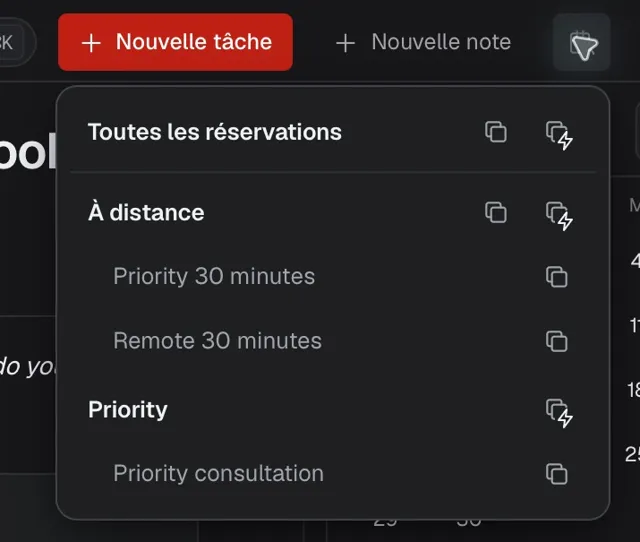
Share a booking group with or without priority access, even when standard and priority types live together. Only meaningful sharing choices appear: one for a group containing a single access class, or two when both are available. Individual type links remain available, including single-use links.
On the web and Mac, compact copy controls keep each group on one row. A lightning badge identifies the link that includes priority bookings. The native Mac Booking menu lists groups and individual types directly, with a lightning marker beside priority types.
Priority access uses a protected opaque link. Editing a link cannot enable priority access. The main public page and ordinary group links exclude priority bookings, and previously shared unprotected priority type links no longer authorize those types. Copy a new protected link when you want to grant priority access.
For single-use links, choose the fallback group and whether it includes priority bookings. New configurations exclude priority by default. Existing confirmed-booking management links and valid single-use links remain usable.
Stay informed when bookings change
Booking confirmations, moves, and cancellations now appear in your inbox and email, with a direct link to the right time in your agenda.
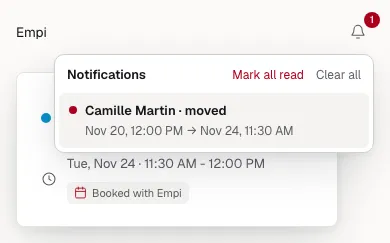
When a guest books, moves, or cancels a meeting through your Empi booking page, you receive a compact inbox update and an email. Rescheduling updates show the previous and new times, so you can immediately see what changed.
Select the notification or the email's agenda button to open the affected date and time. The inbox link also highlights the booking in your agenda. Booking emails respect your email notification settings.
Meetings booked through Empi now carry a Booked with Empi label in meeting details and a short Empi signature in calendar invitations. The audit log records booking creation, rescheduling, and cancellation, including the source of the action and the affected times.
A smoother evening routine, with calendars ready sooner
Empi prepares your calendars while you review your day, and lets you refresh them whenever you need the latest changes.
Your evening routine now prepares calendar information in the background while you review tasks and sort new items. When you reach Plan, Empi calculates the proposal using your saved answers and calendar information synchronized less than ten minutes ago.
Received a new meeting invitation or changed an event elsewhere? Choose Refresh and recalculate to check your calendars immediately and rebuild the proposal, even if they were just synchronized.
If calendar refresh fails, Empi keeps your review answers and lets you retry before using the plan. Applying a plan remains a separate action with its existing calendar checks.
A clearer evening review
Review your day with aligned actions, clearer progress patterns, and a lighter mobile layout.
The evening review is easier to scan on the web and Android.
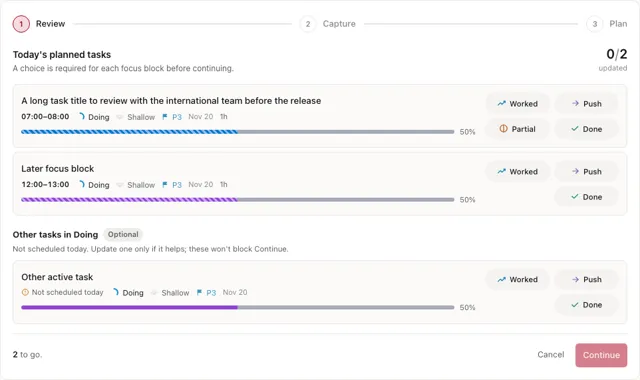
- Actions keep a consistent position, with colored icons and clear labels. Partial uses orange, and Done follows Push.
- Smaller screens use a light list with all four actions together on one row. Unavailable Partial actions stay visible and disabled.
- Progress bars keep their familiar colors, with lighter blue and violet hatching and more distinct forest-green hatching on validated work.
Planned work has one clear heading and instruction. Other tasks in Doing remain in a separate optional section.